

Worldbuilding & stories
Give your world somewhere to live.
Connect characters, lore, maps, family trees and timelines in a free worldbuilding and writing studio.
Jago World · v0.22.0 · Included in JAGO Suite 2.8.0

A look inside the studio
Who lives here? What happened before the story began? What is on the other side of that mountain? Jago World gives the people, places and ideas of a story somewhere to live together.
Write a scene, link a character to a faction, build a map, or follow a family through generations. You can develop the world at your desk and switch to a reading view when you want to explore it.
Keep the world connected
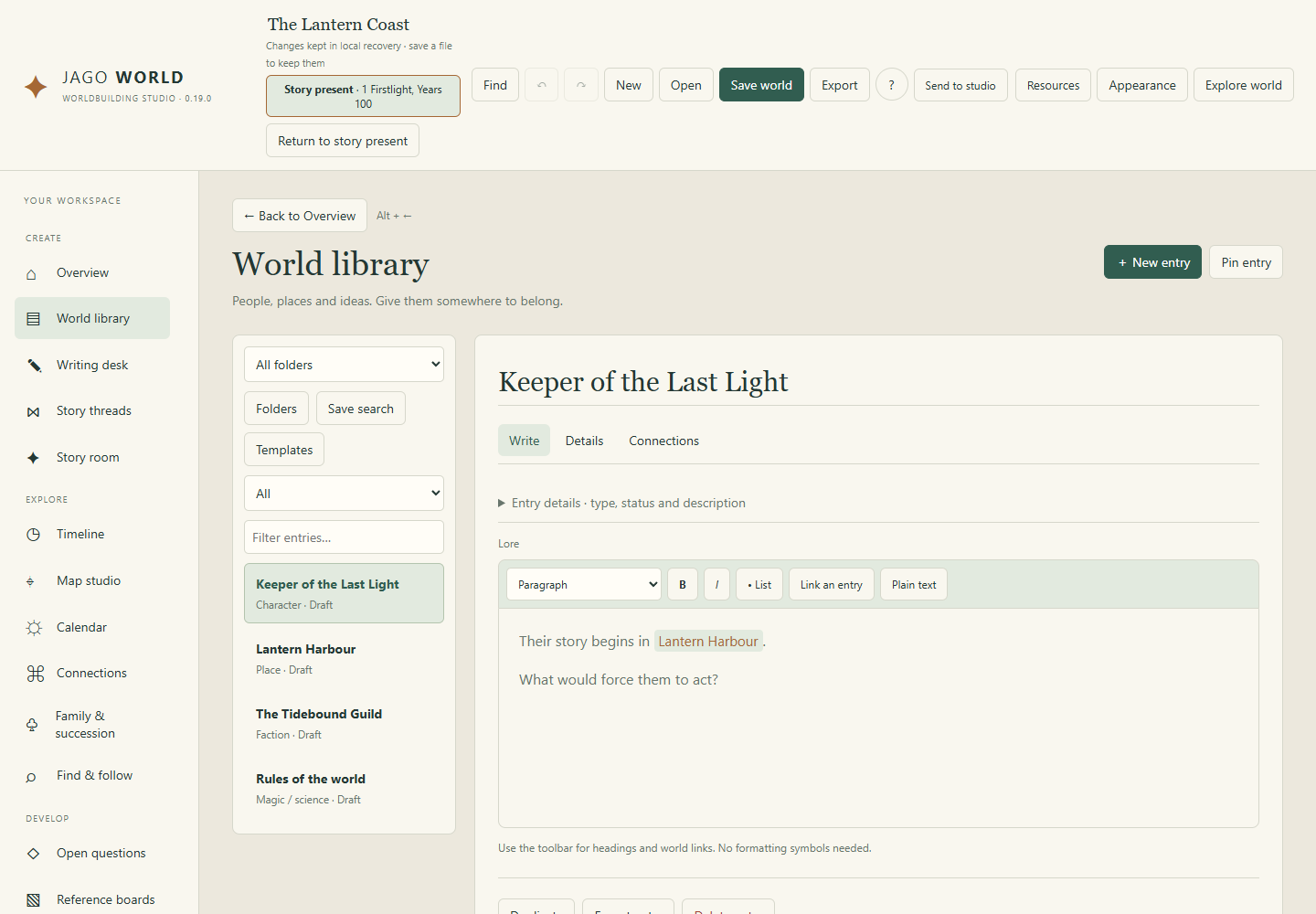
Build a world library of characters, places, factions, world rules and other lore, with custom entry types.
Put it on a map
Start with blank land, ocean, space or an interior, without returning to the main desk for each new map.
Meet the family
Give characters an editable illustrated avatar or import and crop your own portrait.
See what it can do
The tools, in their element.
A few favourite possibilities, with real studio artwork and working interface views. Open the detailed sections below to explore the individual controls.

01 / A LITTLE CLOSER
Give the places a story.
A map is more than a backdrop when its places connect to the world around them. Build a hierarchy from world to region, city or interior, then follow the connections.
- Build connected maps at different scales.
- Draw terrain, routes, shapes and labels.
- Explore linked places in reading and fullscreen map views.
02 / A LITTLE CLOSER
Keep the lore connected.
Give people, places and ideas somewhere to live. Structured entries, your own categories and named-entry links keep useful context close to the story.
- Organise entries with templates and folders.
- Connect relationships, secrets, beliefs and questions.
- Explore family and succession presentations.

03 / A LITTLE CLOSER
A writing desk with a world beside it.
Move from lore into scenes and documents without losing the context. Keep story threads, dates and continuity in view as the writing grows.
- Develop scenes, outlines, points of view and story beats.
- Place events on a timeline and choose the story’s present.
- Share readable HTML, world bibles and map exports.
Explore the studio
The details that make it yours.
Keep the world connected
- Build a world library of characters, places, factions, world rules and other lore, with custom entry types.
- Use linked entries, relationship connections and asset references to keep ideas together.
- Write scenes and reference documents at the writing desk.
- Place events on a timeline and choose the story’s present.
- Genre starting points provide prompts and settings that can be changed or removed.
- Optional spelling checks help with ordinary prose while leaving you free to use invented names.
Put it on a map
- Start with blank land, ocean, space or an interior, without returning to the main desk for each new map.
- Generate editable geography, settlements, sites and interior starting layouts, then refine them with the manual tools.
- Draw and edit shapes, land, regions, routes, rivers, symbols and labels.
- Build room layouts, fortified sites, ships and space-station layouts with the map construction tools.
- Resize selections freely or keep their proportions; rotate and arrange elements.
- Use atmosphere, local detail, overlays, frames, markers, legends and scale bars to finish a map.
- Import Material or Repeat colour tiles as repeating land, water, wood, stone, forest, sand or paper surfaces. Adjust tile width, rotation and offsets.
Meet the family
- Give characters an editable illustrated avatar or import and crop your own portrait.
- Portraits follow characters into entries, reading views, sheets and family trees.
- Connect parents, children, partners, adoptive and chosen-family relationships, or succession links.
- Focus on a person, ancestors, descendants or connected relatives; fold branches and search the tree.
- Create Storybook, Archive, Cinematic or Blueprint family presentations with portraits/cards, headings, dates and a relationship key.
Explore the story
- Explore world offers a dedicated reading view for scenes, entries, maps and linked lore.
- Fullscreen maps support zoom, pan and entry links.
- Use generated names and emblem tools as starting points for your own editable world details.
- Export a readable world bible or a reference bundle when you want to share the setting.
Save the project. Share the result.
- Editable .jagoworld projects
- World-bible Markdown
- Readable HTML references
- Structured JSON world data
- Reference ZIP bundles with text, maps and assets
- Map PNG, SVG and map data
- Styled family-tree PNG and SVG
- Portrait PNG and SVG
Useful for
Novel and comic planning · Tabletop settings · Game lore · Character and faction reference · Family and succession stories · Fantasy, historical and science-fiction maps · Readable setting guides
A few useful things to know.
- Map generation is artistic, not tectonic, hydrological or architectural simulation.
- Complex family relationships can still produce crossing connections.
- Public exports can omit dedicated private fields, but secrets written in ordinary prose require your review.
- Spellchecking depends on the browser/Windows engine; it is not a custom grammar or fantasy-name dictionary.
- Incoming colour tiles are surfaces, not automatically interpreted physical height maps.
Getting started
- Download Jago-World-v0.22.0.zip, right-click it and choose Extract All.
- Open Jago-World.exe for the Windows app, or Jago-World.html in a modern browser for the offline browser edition. No installer needed!
- The Windows app requires 64-bit Windows and Microsoft Edge WebView2 Runtime. If it won’t open, try the HTML version instead.
- Keep supporting folders beside the application. Open the extracted files rather than running from inside the ZIP.
- To use this release in Workscape, open Home → Manage studios → Choose release and select its executable. Existing tabs keep their running version until closed.
Current Windows binaries are unsigned. Check where your download came from and follow your device’s security guidance.
Get Jago World
Windows: 64-bit Windows with Microsoft Edge WebView2 Runtime. Offline browser edition included; native integrations vary by edition.
Release v0.22.0 · Jago-World-v0.22.0.zip